BigCommerce Store Management MCP: Run Your Store from Claude, ChatGPT or Grok (We Tested It)
Short version: BigCommerce has launched the Store Management MCP, a connector that lets the AI agent you already use (Claude, ChatGPT, Grok, Cursor and others) work inside your BigCommerce store. It covers products, prices, inventory, orders, refunds, promotions and store details, and each team member only gets the access you grant them. We connected it to the Magenable sandbox store and asked it to reprice products and audit product pages for SEO. It handled both well. Below: what it can do, how to switch it on, and the limits worth knowing before you hand it your live catalogue.
What BigCommerce announced
The Store Management MCP is BigCommerce’s official Model Context Protocol (MCP) server for running a store. MCP is the open standard AI assistants use to call tools in other systems. In practice it means you can type “we received 50 units of MUG-042” into Claude or ChatGPT, and the stock count in BigCommerce changes.
BigCommerce’s own examples are the jobs that pile up in a busy holiday week:
- “Raise the price of these SKUs by 10%”, or update a wholesale price list in one request.
- “We received 50 units of MUG-042”, and the inventory is updated.
- Rewrite product descriptions, add SEO text, and fill in custom fields like Material or Care.
- Create a “15% off the Winter category” promotion.
- Find an order, get a refund quote, and refund once you confirm the total.
You sign in with your normal BigCommerce login, and the agent never sees your password. BigCommerce says it is available for all stores, and that matches what we found: the option was there in our sandbox store and in a couple of client stores we checked. It does carry an Early access label in the control panel, and the store owner has to switch it on and accept the beta terms.
What the agent can do: 16 tools across six areas
According to the BigCommerce documentation, the server exposes 16 tools. Access is granted per person, per area, as none, read-only or modify.
| Area | What the agent can do |
|---|---|
| Products | Search and read products (with variants, images and custom fields), create products, assign categories, edit names, descriptions and SEO fields, set custom fields |
| Pricing | Set price, sale, cost, MAP and retail prices (up to 10 products and 50 variants per call), and update price list records (up to 1,000 per call) |
| Inventory | Read stock levels by location, and set exact quantities |
| Orders | List orders with line items and shipments, calculate a refund quote, issue a refund |
| Promotions | List promotions, create a single-rule promotion |
| Store | Read the store name, contact details and address |
There is a Customers scope too, but no tool uses it yet, and none of the tools return shopper names, emails, phone numbers or addresses.
We tested it on our sandbox store
We connected Claude to the Magenable BigCommerce sandbox, a test store with BigCommerce’s 13 sample products, and gave it two jobs a merchandiser might do on a Monday morning.
Test 1: find the top 10 products by price and put nine of them on sale
First we asked for the ten most expensive products. It searched the catalogue, returned a table with SKU, list price and sale price, and pointed out something we hadn’t asked about: the most expensive item, the Canvas Laundry Cart, was already on sale at 200.00, so ranked by the price customers actually pay, the Able Brewing System comes first.
Then we asked it to set a sale price $10 below list on items 2 to 10. It updated all nine products and read back each stored value to confirm, rather than just reporting success.

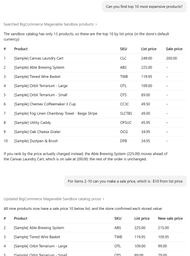
Doing this by hand means opening nine product pages. Done in bulk, it usually means a CSV export, editing in a spreadsheet and re-importing. Here it took two sentences.
Test 2: an SEO review of ten product pages
Next we asked it to review the same ten products for SEO and suggest how to get more traffic to them. It pulled the full record for each product and came back with a prioritised list:
- “[Sample]” in every product name, which ends up in the H1, the title tag and the search snippet.
- No custom page titles or meta descriptions, so search engines fall back to the product name and a random slice of the description. It drafted replacements for all ten.
- No image alt text on any of the 39 images, and file names like
utilitybucket4. - Thin descriptions of 50 to 110 words in one paragraph, with specs as loose lines.
- Missing brands and product identifiers (no GTIN, UPC or MPN), plus placeholder dimensions and weights, which weaken structured data and Google Shopping listings.
- Almost no reviews, so no star ratings in search results.
- Typos in four product descriptions.
It also found product-specific problems a quick skim would miss: two terrarium products with identical copy competing with each other, a towel named “Beige Stripe” that carries 45 leftover size and colour variants, and one product whose URL is formatted differently from the rest.
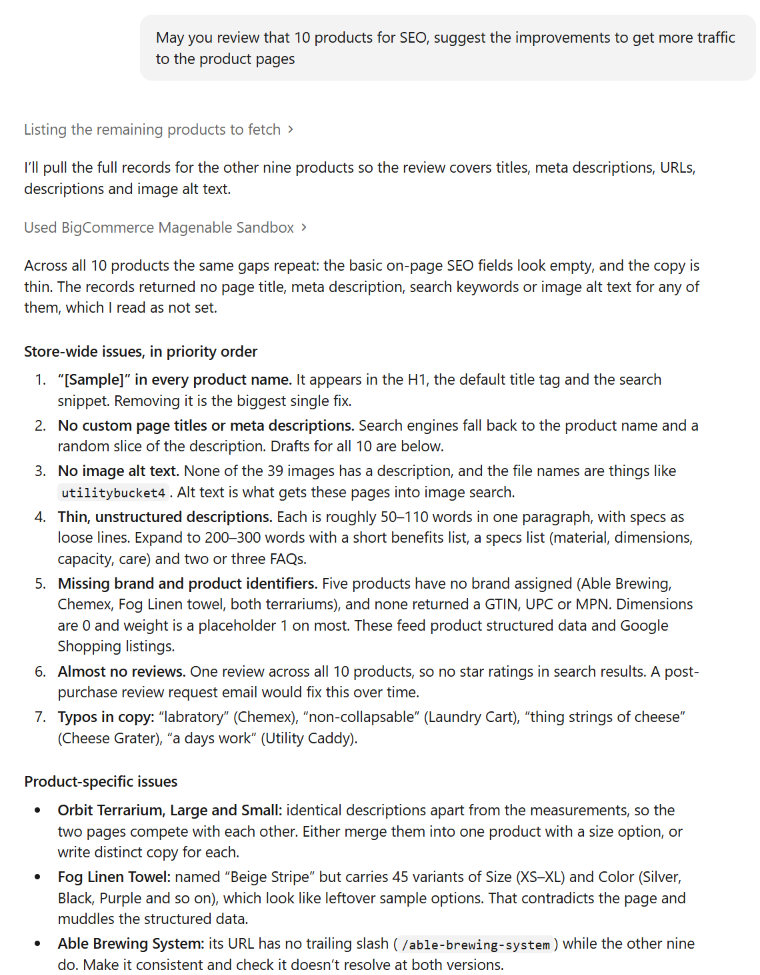
Two honest caveats from this test. First, the agent said the records “returned no page title, meta description, search keywords or image alt text”, which it read as not set. That was right for our sandbox, but on a live store, check a couple of products in the control panel before acting on a finding like that. Second, the tools can rewrite names, descriptions, SEO fields and custom fields, but image alt text isn’t listed among the editable fields, so that part of the fix stays in the control panel for now.
If you want to check the result from the outside afterwards, our free PDP Health Check Chrome extension audits the live product page: title, meta description, structured data, and whether the visible price matches the markup.
How to set it up
- Switch it on (store owner only). In the BigCommerce control panel go to Settings → API and MCP → MCP, turn on Management MCP, and accept the terms.
- Grant access. Click Manage AI agent access and give each person the scopes they need. Everyone starts with no access.
- Connect your agent. Add a custom connector with the endpoint
https://api.bigcommerce.com/mcp:- Claude (desktop or browser): Settings → Connectors → Add custom connector.
- ChatGPT: turn on Developer Mode (Plus, Pro, Team, Enterprise or Edu plans), then add a custom connector with OAuth authentication.
- Grok: grok.com/connectors → New Connector → Custom.
- Claude Code and Cursor are supported too, with a one-line config.
- Sign in with your BigCommerce login when the agent asks, and choose the store.
If you run several stores, each one also has its own endpoint, https://api.bigcommerce.com/stores/{store_hash}/mcp, and each store is switched on separately.
The guardrails BigCommerce built in
- New products are created hidden, and new promotions are created disabled, so nothing reaches shoppers until a person makes it live. Coupon codes still have to be added in the control panel.
- Refunds need a quote first. The refund tool re-checks the quote and refuses if the total or payment option has changed, and it never retries on its own.
- Stock is set as an exact number, never “add 50”, so a repeated request can’t double-count a delivery.
- No shopper personal details come back from any tool.
What to watch out for
The guardrails are sensible, but this is still an agent with write access to a live store. Before you connect it to production, know these limits from BigCommerce’s own documentation:
- Permissions aren’t field-level. “Modify” on Products means the agent can change any price on any product, not just the ones you meant.
- Refunds move real money and can’t be undone through the tool. Only give Orders “modify” to people who would issue refunds anyway.
- Content edits have no undo. Ask the agent to show you the new wording before it saves, and keep a CSV export of the catalogue as a backup.
- The audit trail records the person, not the agent. Every change is logged against the user who signed in, with no record of which agent made it.
- There’s no screen showing live connections, and no way to cut one off instantly, short of turning the MCP off for the whole store (which can take a few minutes) or contacting support.
- Rate limits are shared across all of a person’s agents, so a large bulk job can slow everyone down.
How we’d roll it out
- Start read-only. Reporting, catalogue reviews and SEO audits like our second test need no write access, and they are where agents shine.
- Test write jobs on a sandbox before pointing them at the live store, as we did here.
- Give “modify” to one or two people, and keep Orders “modify” (refunds) with whoever already handles refunds.
- Ask for a preview before every bulk change: “show me the table of old and new prices, then wait for my OK.”
This is one more step towards agentic commerce: not AI replacing the team, but the repetitive admin moving into a chat window, at the time of year when the team has the least time for it.
FAQ
Which AI agents work with the BigCommerce Store Management MCP?
BigCommerce documents setup for Claude (desktop, browser and Claude Code), ChatGPT, Grok and Cursor. Other clients that support standard MCP with OAuth should also work.
Does it cost extra?
BigCommerce’s documentation doesn’t mention any fee for the MCP itself. Your AI agent may need a paid plan: ChatGPT custom connectors, for example, need Developer Mode on a Plus, Pro, Team, Enterprise or Edu plan.
Can the agent publish products or start a sale without me?
No. New products are created hidden and new promotions disabled; a person makes them live. It can, however, change prices on existing products straight away if you grant Products “modify”.
Can the agent see my customers’ personal details?
No. None of the tools return shopper names, emails, phone numbers or addresses.
Is it production-ready?
It is available to all stores we checked: we found it in our sandbox and in a couple of client stores. But it is still labelled Early access. We’d use it for reviews and reporting straight away, and for write tasks once you’ve tried them on a sandbox and set permissions carefully.
Want help setting it up?
Magenable builds and supports BigCommerce stores, including B2B BigCommerce. If you’d like a hand choosing permissions, testing workflows on a sandbox, or acting on what an agent finds in your catalogue, get in touch.