Robert Cialdini (author of Influence: The Psychology of Persuasion) describes Scarcity as our tendency to value things more when they feel limited.
In ecommerce, scarcity works because it increases the cost of waiting: customers feel they might miss out on stock, a delivery window, an early-bird price, or access.
But scarcity is also one of the fastest ways to lose trust. If the urgency is fake, customers learn your site is noisy, not helpful.
This post is Scarcity done the ethical, UX-first way: communicate real constraints clearly, reduce uncertainty, and help customers make decisions faster.
Article series: Part 1 (Social Proof) -> Part 2 (Authority) -> Part 3 (Scarcity)
What you’ll get:
- A practical Scarcity framework you can apply to any store
- Examples from Australian ecommerce pages (using real screenshots)
- Implementation rules to avoid gimmicks and contradictions
What Scarcity is (in ecommerce terms)
Scarcity answers one question:
“If I wait, what do I risk losing?”
That “loss” can be stock, time, access, capacity, or pricing. The goal is not to pressure people into bad decisions. The goal is to surface real constraints so customers can decide with confidence.
A practical classification of Scarcity in modern ecommerce
Most scarcity signals fall into these buckets:
- Inventory scarcity (stock is low)
- Time scarcity (a deadline matters)
- Access scarcity (not everyone gets it)
- Capacity / lead-time scarcity (limited throughput, long lead times)
- Price-window scarcity (price changes after a date)
Below is how each works – and how to implement it without undermining trust.
1) Inventory scarcity: “Only X left” (the most common)
This is the classic pattern. It works best when it’s specific and (if you sell variants) variant-level (size/colour), not generic.
Best practice:
- “Only 3 left in Size M” (variant-level)
- “Back in stock 12 Feb” (date-level)
Avoid:
- “Selling fast” with no evidence
- “Only 2 left” on every product forever
Where it belongs:
- Category pages (shortlisting)
- Product page (PDP) (moment of truth)
Examples: inventory scarcity on the PDP
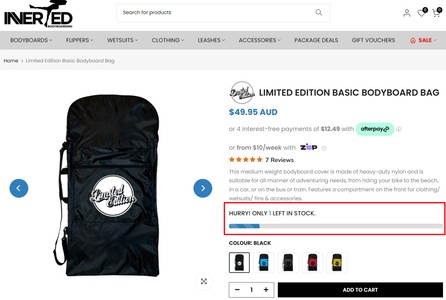
Bodyboardshop uses a clear stock message in the buying area: “HURRY! ONLY 1 LEFT IN STOCK.”

Epicure Homewares uses the same idea in a simpler form: “Only 1 left in stock” placed near the price and add-to-cart.

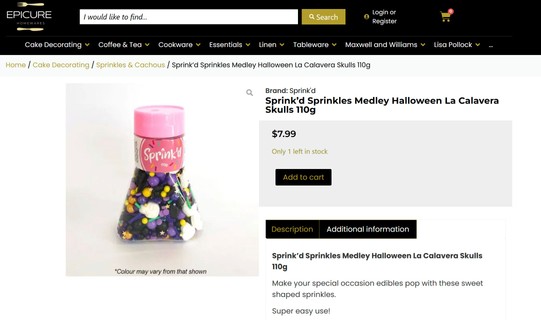
Implementation note: if your stock sync is delayed (or you have multiple warehouses), avoid precise numbers. Use “Low stock” instead of “Only 2 left” to prevent contradictions later in the journey.
2) Time scarcity: a real deadline that matters
Time scarcity works when the deadline is tied to something real: dispatch cut-offs, delivery windows, or a campaign end-date that truly ends.
Best practice:
- Tie deadlines to operations (dispatch) or a genuine end-date (promo)
- Keep the same message consistent from PDP -> cart -> checkout
Avoid:
- Always-on countdown timers that reset on refresh
- Timers that appear only when a user hesitates (they feel manipulative)
Example: dispatch cut-off countdown (ethical time scarcity)
Di Pacci shows a live dispatch countdown: it connects urgency to a real operational outcome (ship tomorrow / delivery window), which is exactly the ethical version of time scarcity.

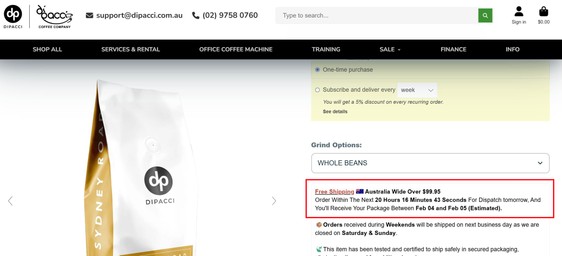
Figure 3: Di Pacci – dispatch cut-off countdown (time scarcity tied to operations)
3) Access scarcity: limited access, not limited stock
Access scarcity is often less “salesy” than stock scarcity because it’s about availability to certain people (members, waitlists, early access), not whether the product exists.
Common patterns:
- Waitlists / “coming soon” signups
- Member-only releases or pricing
- Limited drops with early access windows
Ethical implementation: make the next step explicit (sign up, log in, request access) and use access scarcity to capture intent, not manufacture panic.
Example: coming soon + waitlist
The Cruiser Company uses a “COMING SOON” page with a waitlist CTA, which is a clean way to capture demand without pretending stock exists today.

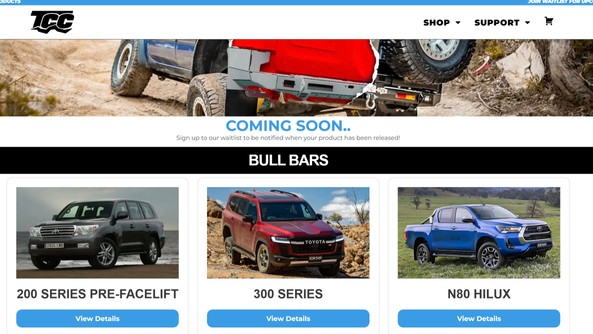
Figure 4: The Cruiser Company – “Coming soon” waitlist (access scarcity)
4) Capacity / lead-time scarcity: when delivery and throughput are constrained
This is underused in ecommerce – and often more credible than “Only X left” because it’s transparent about constraints in production, supply chain, or fulfilment.
Examples:
- “Expected delivery from [month/year]” (pre-orders)
- “Next dispatch window: Monday”
- “Limited booking slots” (services)
Ethical implementation: be specific about the constraint (date / window / capacity), and avoid pretending lead times are shorter than they are.
5) Price-window scarcity: price changes after X
This is common (intro pricing, pre-order pricing), but it must be handled carefully: if customers feel “tricked”, it turns into distrust instead of motivation.
Best practice:
- Make the window explicit (dates)
- State the current price and the future price clearly
- If possible, explain why (intro pricing, supplier increase, order cut-off)
Example: pre-order pricing with an explicit increase date
The Christmas Shop shows a strong (and transparent) combination: pre-order lead time plus a clearly stated price increase after a specific date. This is a good example of scarcity that is informational, not performative.

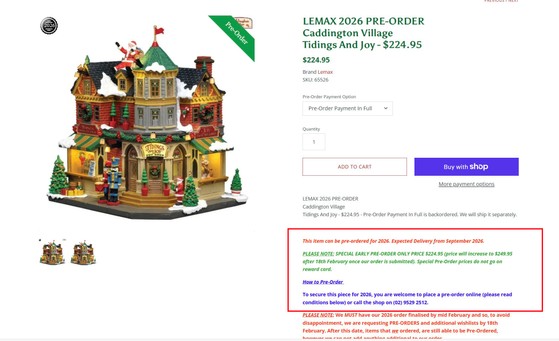
Figure 5: The Christmas Shop – pre-order lead time + explicit price increase after a date (capacity + price-window scarcity)
Where to use Scarcity in the customer journey
Good scarcity reduces wasted clicks and unpleasant surprises. The best placements are:
- Category and search results: help customers shortlist faster
- PDP: confirm the constraint at the moment of decision
- Cart and checkout: keep scarcity messages consistent (do not contradict earlier claims)
- Out-of-stock states: capture intent with alternatives or restock options
Example: low-stock and sold-out signals on a product grid
Planet Cocoa shows a browsing grid where customers can see both “Sold Out” items and an “only 6 left in stock” message before clicking through. This is exactly how scarcity can reduce wasted clicks.

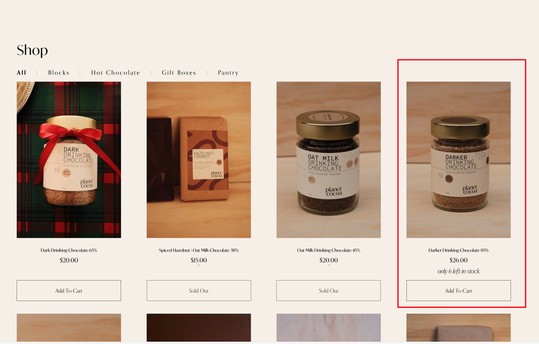
Figure 6: Planet Cocoa – category/grid shows “only X left” plus sold-out items (inventory scarcity on PLP)
Out of stock: Scarcity without a dead end
The worst version of scarcity is “out of stock” with no next step. When intent is high, treat out-of-stock as a conversion opportunity.
Good “escape hatches” include:
- Restock notifications (“email me when available”)
- Backorder dates (“ships on 12 Feb”)
- Substitutes (“similar products”)
Figure 6 already shows a basic version of this: sold-out items remain visible in the browsing experience. The next step is to add a clear capture mechanism (notify me / waitlist) so you retain demand rather than losing it to another retailer.
UX-first rules for ethical Scarcity
If you want scarcity to lift conversion without eroding trust, use these rules:
- Make it verifiable: tie signals to real stock, real ops, real dates
- Keep it consistent across PDP -> cart -> checkout
- Use precision over hype (“Only 2 left in Size M”, not “Selling fast”)
- Always include an escape hatch for out-of-stock states
- Prefer waitlists over panic (capture demand without manipulation)
Common anti-patterns (and why they backfire)
These scarcity mistakes quietly erode trust:
-
The forever timer: a countdown that resets or never really ends.
- Why it backfires: customers learn your deadlines are not real.
-
Generic urgency everywhere: “Selling fast” across half the catalogue.
- Why it backfires: it reads like copywriting, not information.
-
Contradictory stock messages: “Only 2 left” on PDP -> “in stock” in cart -> “out of stock” at checkout.
- Why it backfires: anxiety, drop-offs, and support tickets.
-
Scarcity with no next step: “Sold out” with no notify, no backorder date, no alternatives.
- Why it backfires: you waste peak intent.
A good rule of thumb: if you cannot explain the scarcity signal operationally, do not ship it.
Quick implementation checklist
If you’re improving scarcity signals, start here:
- Add variant-level stock on PDP (or use “Low stock” if you cannot trust the number)
- Add low stock indicators on category tiles (shortlisting)
- Add dispatch cut-offs only if operations can support them
- Add backorder dates where relevant (prevents surprise)
- Add restock notifications / waitlists for sold-out or coming-soon items
Measurement (do not fly blind)
Track both conversion and trust signals:
- Conversion rate / revenue per session
- Cart-to-checkout drop-off (scarcity can increase anxiety if done badly)
- Refund/return reasons
- Support tickets mentioning stock, delivery, timers, or discounts ending
- Waitlist/restock opt-in rate (healthy ethical-scarcity metric)
Summary
Scarcity works in ecommerce when it’s credible and operationally true:
- Inventory scarcity (specific, ideally variant-level)
- Time scarcity (real deadlines tied to dispatch or delivery)
- Access scarcity (waitlists / early access)
- Capacity scarcity (lead times and throughput constraints)
- Price-window scarcity (clear date + clear new price)
This is Part 3 in our Cialdini series.
Next: Part 4 – Reciprocity (how giving value first changes conversion).