In our previous article, we introduced Model Context Protocol (MCP) as a new standard that helps AI assistants interact with business systems in a clean and controlled way.
This follow-up focuses specifically on how MCP applies to Magento Open Source and Adobe Commerce, and how retailers can get started right now using the open-source Magento MCP server developed by Magenable.
GitHub link to the server: https://github.com/magenable/magento2-mcp
This is written for a business audience—no deep tech expertise is required. The aim is to explain in practical terms how an MCP server for Magento/Adobe Commerce makes your store AI-ready.
Why Magento and Adobe Commerce Benefit from MCP
Both Magento Open Source and its commercial sibling Adobe Commerce expose rich data via APIs—products, prices, stock, orders, customers.
But when retailers try to connect AI tools (for search, support, merchandising or analytics), they often hit a wall:
Each AI provider needs its own custom integration.
That means duplicated work, fragile scripts, and security risks.
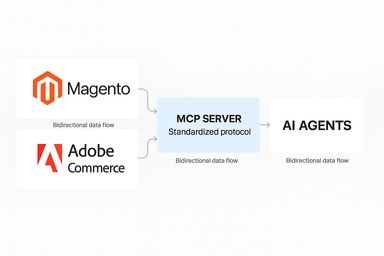
A Magento MCP server or Adobe Commerce MCP server solves this by offering a standard interface that AI assistants can use safely. Instead of custom wiring for every AI tool, MCP provides a universal port that any MCP-aware AI client (ChatGPT, Claude, Azure OpenAI, etc.) can plug into.
What an MCP Server Does (Simple Explanation)
Whether it’s a Magento MCP server or an Adobe Commerce MCP server, its job is to sit between your store and the AI system, providing:
-
A defined list of allowed actions (“tools”)
-
A predictable way for AI to call those tools
-
Security and permission controls
-
A simplified interface over the existing REST APIs
This ensures AI can only perform the actions you explicitly allow—nothing more.

Introducing Magenable’s Magento MCP Server / Adobe Commerce MCP Server
Magenable’s implementation of an MCP server is available here:
👉 https://github.com/magenable/magento2-mcp
It is a fork of the original MCP server by Bold Commerce:
https://github.com/boldcommerce/magento2-mcp
Their work provided a strong foundation, which we appreciate. Magenable’s version extends this by adding support for remote MCP tools, enabling the MCP server to work with external services or microservices (like OpenAI Agent Builder platform).
This MCP server for Magento/Adobe Commerce:
-
Works with Magento Open Source and Adobe Commerce
-
Installs on the same server where you host your Magento/Adobe Commerce, on your local machine or a separate server
-
Wraps Magento’s REST APIs as clean MCP tools
-
Focuses on real ecommerce use cases (catalog, carts, orders, customers)
-
Provides controlled, safe access instead of exposing the entire API
This approach makes Magento MCP server (Adobe Commerce MCP server) practical for retail AI projects such as shopping assistants, customer service copilots, merchandising tools, and internal operational agents.
Current Capabilities of the Magento/Adobe Commerce MCP Server
1. Product & Catalog Tools
-
Product lookup
-
Catalog search
-
Images, attributes, pricing
-
Stock availability
Useful for AI shopping assistants, catalog quality checks, and content generation.
2. Cart & Checkout Tools
-
Create cart
-
Add/remove items
-
Get totals and shipping methods
Enables AI to prepare draft carts and refine selections in real time.
3. Order & Fulfilment Tools
-
Retrieve order details
-
Shipment information
-
Order status
Ideal for AI customer service copilots.
4. Customer Tools
-
Fetch customer profiles
-
Order history
-
Saved addresses
Supports personalised shopping or service experiences.
Security & Governance Benefits
A key advantage of implementing a Magento MCP server or Adobe Commerce MCP server is security.
With Magenable’s server:
-
You choose which MCP tools to expose
-
Tools can be read-only or restricted
-
Sensitive functions (e.g., refunds) stay behind manual approval
-
All actions can be logged
-
Magento permissions add an extra control layer
AI receives only the structured, limited access you approve.
How AI Assistants Use the MCP Server
Here’s how an AI assistant interacts with your Magento MCP server in real scenarios:
Example: Shopping
Customer: “Show me women’s boots under $180.”
AI: Calls product search → returns Magento results.
Example: Cart building
Customer: “Add the black one in size 38.”
AI: Uses cart tools → adds item → returns cart summary.
Example: Support
Agent: “What’s happening with order 200057?”
AI: Retrieves order + shipment info instantly.
Example: Merchandising
Team: “Which items are missing short descriptions?”
AI: Queries catalog → delivers a list.
In all cases, the AI uses live Magento/Adobe Commerce data—not stale exports.
How to Start Using the Magenable Magento MCP Server
Setup is straightforward:
-
Install via Composer
-
Configure API credentials
-
Choose which MCP tools to expose
-
Connect your AI platform of choice
-
Test with a simple prompt
Full installation instructions are in the GitHub repository.
Use Cases For Magento MCP server
1. AI Shopping Assistants
Real-time search, stock checks, cart recommendations.
2. Customer Service Copilots
Faster resolution for order and shipping enquiries.
3. Merchandising & SEO Automation
Descriptions, titles, metadata generated from live product data.
4. Internal Inventory & Sales Insights
AI agents that surface trends or flag anomalies.
These use cases require no large rebuild—just a capable Magento/Adobe Commerce MCP server and clear tool permissions.
Roadmap for the Magenable Magento MCP Server
We are working under a new version of Magento MCP server built from the ground-up (not a fork) with more flexible data and smarter search and filtering filtering for product catalog, customer and orders data, keeping HTTPS and local connection support. The initial release is coming soon.
We’re continuing to expand the project based on merchant feedback.
Conclusion: Making Magento and Adobe Commerce Ready for AI
AI becomes far more useful when it can act—not just chat.
A Magento MCP server or Adobe Commerce MCP server is a practical way to unlock action-oriented AI for ecommerce without rewriting your platform or exposing risky APIs.
Magenable’s open-source MCP server gives retailers a safe, flexible and future-friendly way to bring MCP into their business stack.
👉 Magenable Magento/Adobe Commerce MCP Server
https://github.com/magenable/magento2-mcp
If you’re exploring MCP or planning AI initiatives around Magento or Adobe Commerce, we’re ready to help with strategy, architecture and implementation. Just drop us a line via contact page.